Combat in The Doors of Trithius is turn-based and built around timing. Each action you take progresses time, giving enemies more or less time to respond.
You can attack by clicking on an enemy or walking into them. This performs your default weapon attack.
Your abilities are shown on the hotbar. Everyone starts with Jump, and some backgrounds add a signature ability. New abilities are unlocked by choosing skills.
Keep reading to learn more about how combat works.
Health & Energy
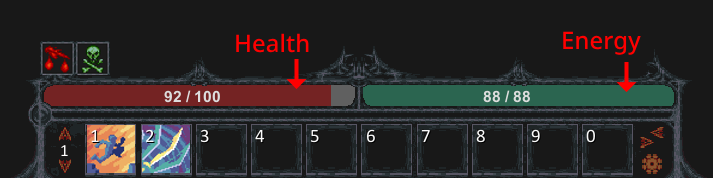
At the bottom of your screen you'll see your health and energy.
Health is your life total:
Health regenerates a small amount each turn, based on your Health Recovery stat.
You can recover more quickly by eating food, drinking potions, or using healing abilities.
Energy is used to cast spells and activate abilities:
It regenerates automatically each turn, based on your Energy Recovery stat.
Basic weapon attacks cost a little energy too (5 by default), about what you regain each turn. Attacking alone won't refill your energy for abilities.
If you rest on your turn (default space), you'll gain extra energy. Resting can be a surprisingly powerful technique in combat.
Unlike many RPGs,
The Doors of Trithius has no attributes. There are very few ways to increase your max health.
Most humans in the world have around 100 health. Weak monsters will have less. Stronger monsters may have hundreds. To survive you'll need to improve your defenses through better gear, abilities, or buffs.
Status Effects
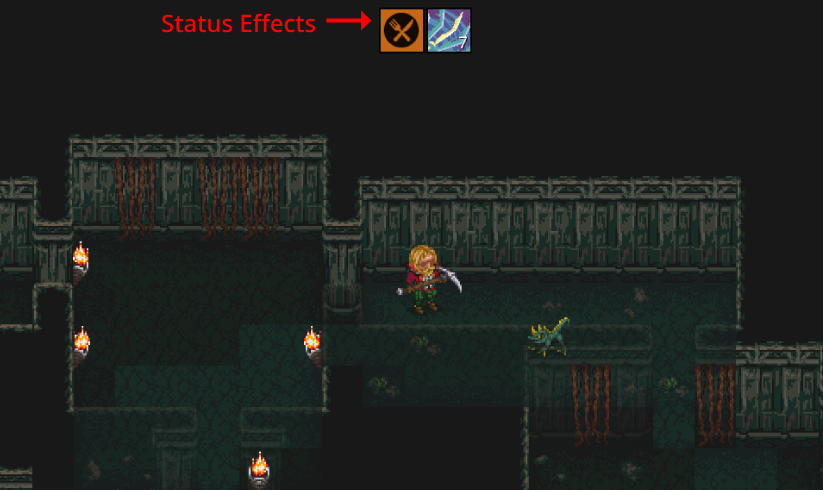
Status effects are temporary bonuses or penalties. You'll see them at the top of your screen.
Most status effects last a number of turns. Hover your mouse over any status icon to see details.
Some monster attacks apply status effects. For example, Webber Spiders can shoot a web that gives you the
Webbed status for 3 turns, slowing your attacks and movement.
There are also persistent status effects, such as hungry,
starving, or
encumbered. These don't expire on their own, and their icons are orange.
Wounds
Wounds are long-term debuffs that appear just above your health bar.
To heal a wound you can use medicine items like
bandages (for bleeds) or
splints (for cripples). Some wounds, like bleeds and poisons, also have a small chance to heal themselves each turn.
The Medicine skill helps with crafting cures, but most towns sell basic treatments too.
Common Wounds
Wound
Effects
Description
Bleed (severe)
Deals 2 damage per turn.
Deals 2 damage every turn. Becomes a regular bleed wound after 10 turns. Cauterize with bandages or other medicine to heal immediately.
Bleed
Chance to deal 1 damage each turn.
Has a 25% chance to deal 1 damage every turn, and a small chance to remove itself over time. Cauterize with bandages or other medicine to heal immediately.
Poison
Deals stacking damage each turn.
Deals damage every turn, which increases with each additional stack. Has a small chance to remove itself over time. Treat with antidote or other medicine.
Cripple
Reduces move speed and disables mobility actions.
Significantly impedes movement and prevents jumping or other athletic-based abilities. Set crippled limbs with a splint or other medicine.
Burn
Reduces max health and crit chance.
Deep tissue burns affect your will to fight, reducing maximum health and critical hit chance. Treat with soothing balm or other medicine.
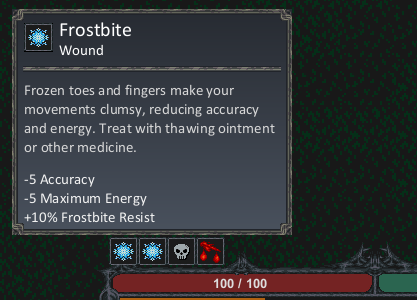
Frostbite
Reduces accuracy and max energy.
Frozen toes and fingers make your movements clumsy, reducing accuracy and energy. Treat with thawing ointment or other medicine.
See the Status Effects page for a complete list of wounds.
Resisting Wounds
Most wounds have a resistance stat: Bleed Resist, Poison Resist, and so on.
Wound Resist protects against all of them.
For a wound to be inflicted via combat, the enemy must damage you. Dodged or 0-damage hits can't apply wounds.
Since wounds can stack they can quickly turn a fight deadly. Bring medicine when exploring dungeons. Still, not every wound needs immediate treatment. Some can wait until you're back in town.
Inspecting Monsters
Traits
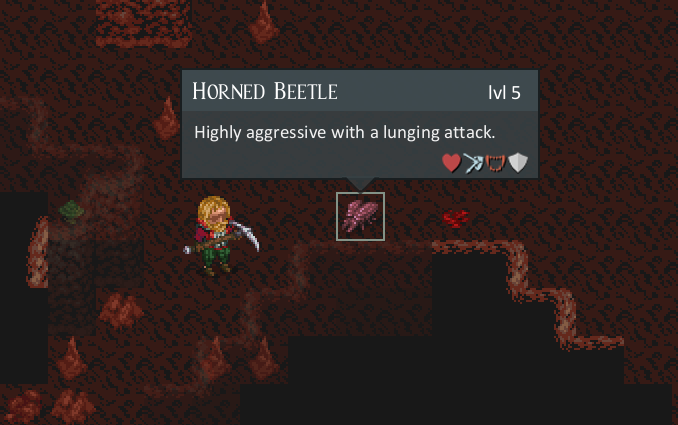
Right-click any monster to see its traits.
The bottom row shows
trait icons. These hint at the monster's special attacks and what wounds it may inflict.
Monster Health
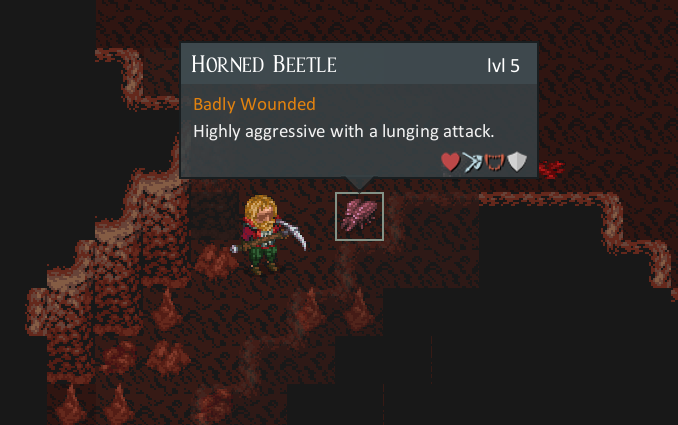
Exact HP is hidden. Instead, the inspect window will tell you if a monster is
Badly Wounded (55% health or less) or Near Death (10% or less). No label means it is still healthy.
You can also hold the "Display Names" (default N) key to reveal all monster names in sight. Monster name color changes with damage:
Orange: Badly wounded
Red: Near death
Attacking & Time
Actions & Time
Most actions you take such as moving, attacking, opening a door, or using an ability, consume time and take a turn.
(note: some actions, like drinking a potion, are
instant and don't consume a turn).
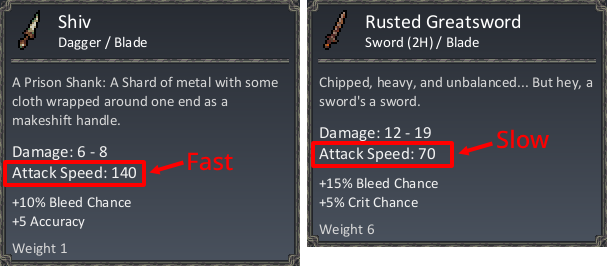
Not all actions pass the same amount of time. Faster actions give enemies less opportunity to respond. If you're fast enough, you can act multiple times before your enemy does.
Your speed is based on your movement and attack speed stats. You can improve these with potions, abilities, or equipment.
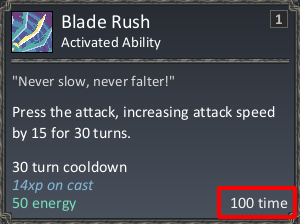
Example:Blade Rush is an ability that increases your attack speed. Activating it takes time as well, shown in the lower-right corner of the tooltip.
Some abilities use your base speed, other abilities modify or override your base speed for extra fast (or slow) attacks.
For a weapon attack, the time taken is 200 minus your Attack Speed. A 140-speed Shiv attacks in 60, a 70-speed Rusted Greatsword in 130. The Gear guide covers comparing weapons.
Abilities
Your abilities are located on the hotbar. At the start, most characters only have
Jump and perhaps one ability from their background, but more unlock as you invest in skills.
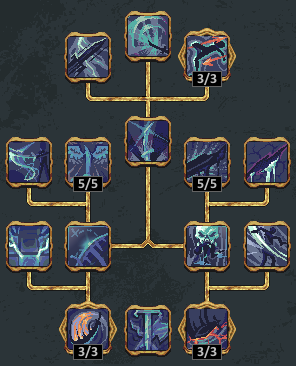
Each skill has its own tree with active abilities and passive bonuses. Select a skill and hover our mouse over any ability to see full details.
Winning fights will depend on using your abilities well. For example, Knight's Challenge from the Chivalry tree forces an enemy to attack only you, and weakens its hits.
Types of Abilities
Type
Description
Passive
Always active. No input needed.
Activated
Applies a buff or effect, then ends your turn.
Stance
Applies a timed buff. Often extended by specific actions. Entering a stance ends your turn.
Toggle
Can be turned on/off. Has a per-turn cost. Doesn't end turn when enabled.
Targeted
Aims at a tile or enemy. Ends turn after targeting.
Next: learn more about how character progression, gaining XP, and unlocking new skills and abilities.